Version 1.96 released.


Version 1.96 is available on the App Store. Bugs of ver.1.95 were fixed. Please update the app.


Notice for iOS 4 users


At 1st access to Camera Roll from PhoneGrafer, the message “PhoneGrafer would like to Use Your Current Location” will be appeared. Please select “OK”.

alert screen

If you select “Don’t Allow”, Camera Roll will be 0 photos, because OS deny access to metadata of photo.
If you once selected “Don’t Allow”, Please enable location service of PhoneGrafer from iPhone’s Settings - General - Locaition Services.


Version 1.95 released.


Version 1.95 is available on the App Store. It supports iOS 4.

*Specification about Exif has changed on iOS 4.
- Has limitation of Exif embedding. Cannot embed GPS, model, DateTime, etc.
- Can display all items of embedded Exif / meta data.

*Version 1.95 have problems below. We’ve already submitted a newer version to Apple. Sorry for any inconvenience.
- On settings screen and filter screen, photo size information is not correct. (iPhone 4 only)
- Cannot take a photo under specific setting: no filter & small photo size & iOS 4.


50% off sale on now.


screenShot1

50% off-price sale on now: 29 Apr. to 5 May. Check the price at App Store.


Screens, features


Main screen
Main screen
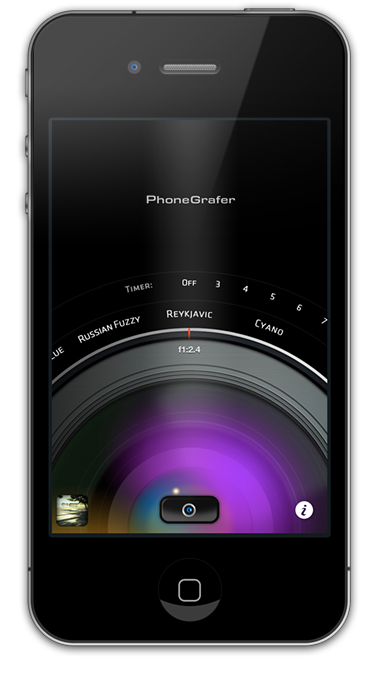
Access any functions from here, and change filter/timer by dial interface.
Camera / Normal Camera
Camera screen have a digital zoom, a self-timer, and a leveler. Normal camera mode (*iPhone 3GS only) have a “tap to focus” function.
Camera Roll
Camera Roll
Displays photos of Camera Roll.
Photo Viewer
Photo Viewer
Displays a photo. Viewer have a filter function, a Twitpic uploader, and a Flickr(R) uploader.
Apply Filter
Apply Filter
Select a filter and photo size, and apply to a photo. You can check effects by preview screen.
Settings
Russian filter setting
Some filters have parameter settings.
Settings - B&W Extreme
Twitpic uploader
Post photo and message to Twitpic.
Settings
Settings
Change any settings of PhoneGrafer.
Exif Viewer
Exif Viewer
Displays Exif metadata. Opens Google Maps by GPS tags.
Photo Size 2048×1536*, 1600×1200, 800×600, 427×320 *iPhone 3GS only
Filters B&W, B&W Extreme, Russian, Antique, Sepia, Cyano, ColorCast-C/M/Y
Filters (Viewer only) Sharpen, Soften

Photo samples


photo1
B&W Extreme
photo2
B&W Extreme
photo3
B&W Extreme
photo4
B&W Extreme
photo6
B&W
photo8
Russian
photo9
Cyano
photo5
B&W Extreme
photo10
Cyano
photo11
Cyano
photo12
Russian
photo19
Russian
photo13
Antique
photo14
Sepia
photo15
(Original)
photo16
ColorCast-C
photo17
ColorCast-M
photo18
ColorCast-Y